VTeam GitHub
Announcing FIDE 1.1, the Flutter IDE · by invitation

Built in Flutter.
For Flutter fans.

FIDE is an open-source IDE that only cares about one thing: your Flutter project. Widget trees, live @Previews, ARB files, platforms, tests and a quality score are built into every panel, and its AI runs on your own machine. It's written in Dart, so you already know how to make it better.

Grassroots project: the install is a bit hacky for now. Read the heads-up.

  • Open source · MIT
  • macOS · Windows · Linux
  • Local AI with Ollama
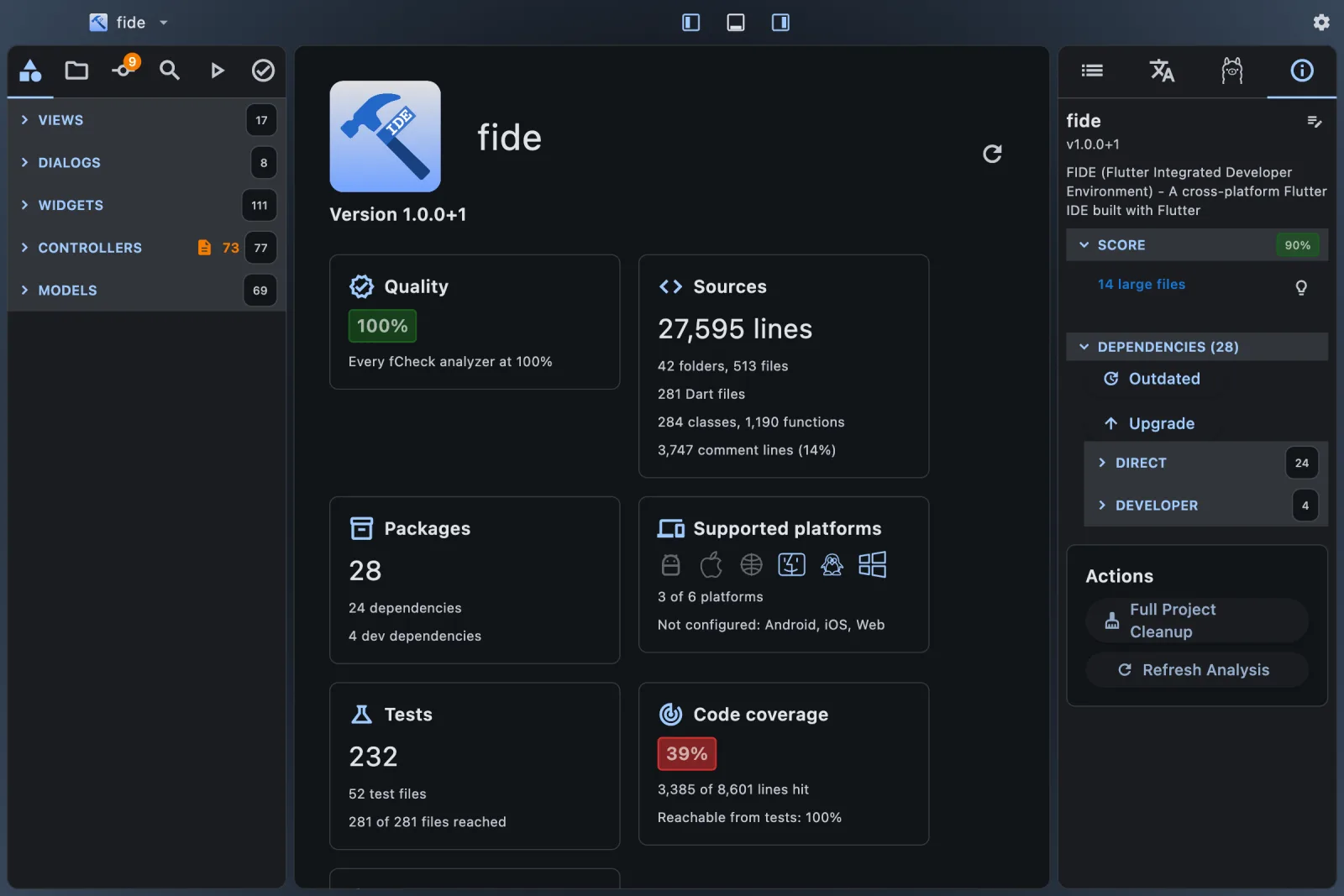
FIDE showing its Project Overview: fCheck quality score, source size, packages, platforms, tests and code coverage
FIDE opened on its own source: the Project Overview, with the fCheck quality score up front.
Why FIDE

Another IDE? In a VS Code world?

Fair question. VS Code is a superb general-purpose editor and its Flutter extension is excellent. But a general-purpose editor treats Flutter as one language among hundreds. We wanted to find out what an IDE looks like when Flutter is the only thing it has to care about.

01

Flutter isn't a plugin here. It's the whole point.

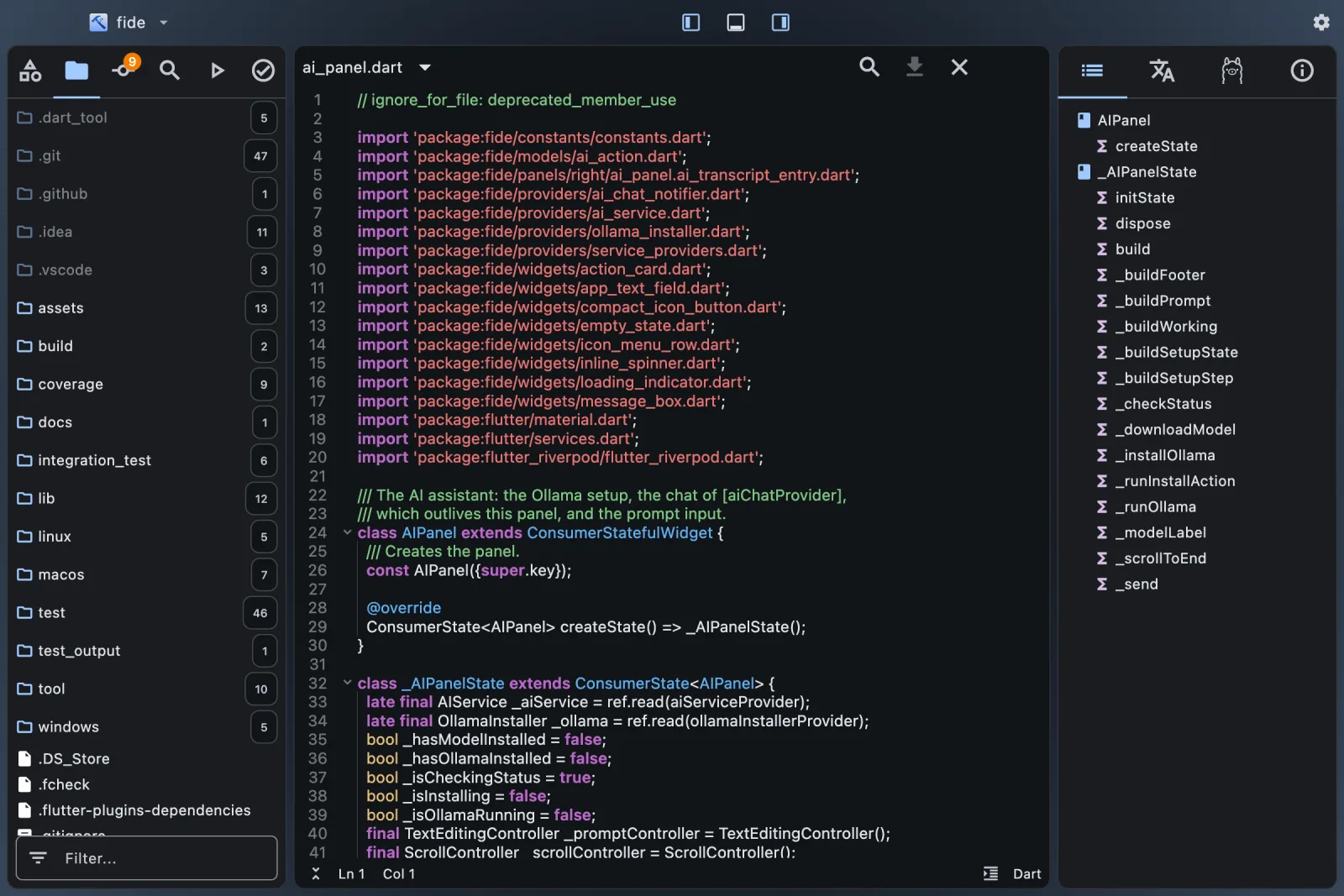
The explorer groups your project into Lib, Tests, Assets, Platforms and Output. The outline draws the widget tree of every build method. Your @Preview widgets render live as you save. Nothing to assemble from a marketplace first.

02

Written in the language you write every day.

VS Code is TypeScript on Electron. FIDE is Dart on Flutter desktop: the same widgets, Riverpod and tests you use at work. If something bugs you, open FIDE in FIDE, fix it, and send the pull request.

03

Proof that Flutter desktop can carry a real tool.

A code editor, a terminal, a Git client, an audio editor, an architecture graph: over 27,000 lines of Dart, native on macOS, Windows and Linux. Every feature we ship is one more demo of what Flutter can do on the desktop.

04

Quality is the workflow, not an afterthought.

fCheck scores your project from 0 to 100%: size, dead code, docs, duplicates, hardcoded strings, layers, magic numbers, localization. FIDE shows each deduction where it lives and fixes what it can. FIDE itself scores 100% with fcheck --strict.

05

Deterministic first, AI second.

Mechanical refactorings are instant quick fixes: strings move to ARB files, members get sorted, duplicated widget code becomes one shared widget. The model only gets what code can't decide, and it edits your files instead of handing you snippets to paste.

06

Private by default.

Analysis runs locally. The AI runs on your machine through Ollama, which FIDE installs and sets up for you. Your code stays on your laptop, and there's no account to create.

We love VS Code too. Keep it. Put FIDE next to it for a week, then tell us what it should do better.

What's in 1.1

One window, and every panel knows it's a Flutter project.

Organized explorer

Your project by role: Root, Lib, Tests, Assets, Platforms, Output. Plus the classic folder tree and a Git view.

Widget-tree outline

Under every function that returns widgets, the tree it builds, nested by slot: child, children, body, appBar… Click a node to jump to it.

Live @Preview

Your previews render headless as you save. Drag to resize, then Fix Size writes the size back into the annotation.

Run, test, coverage

Build, run, debug and clean per platform. Run the tests, see the coverage, click any path:line:column in the output.

fCheck quality

One score for the whole project, every finding with its file and line, and the best practice that fixes it.

Localize

Sets up gen-l10n, moves hardcoded strings into ARB files, and translates missing keys with the local model.

Git

Stage, commit, push and pull. Side-by-side diffs, recent commits, and an AI-drafted commit message.

Local AI assistant

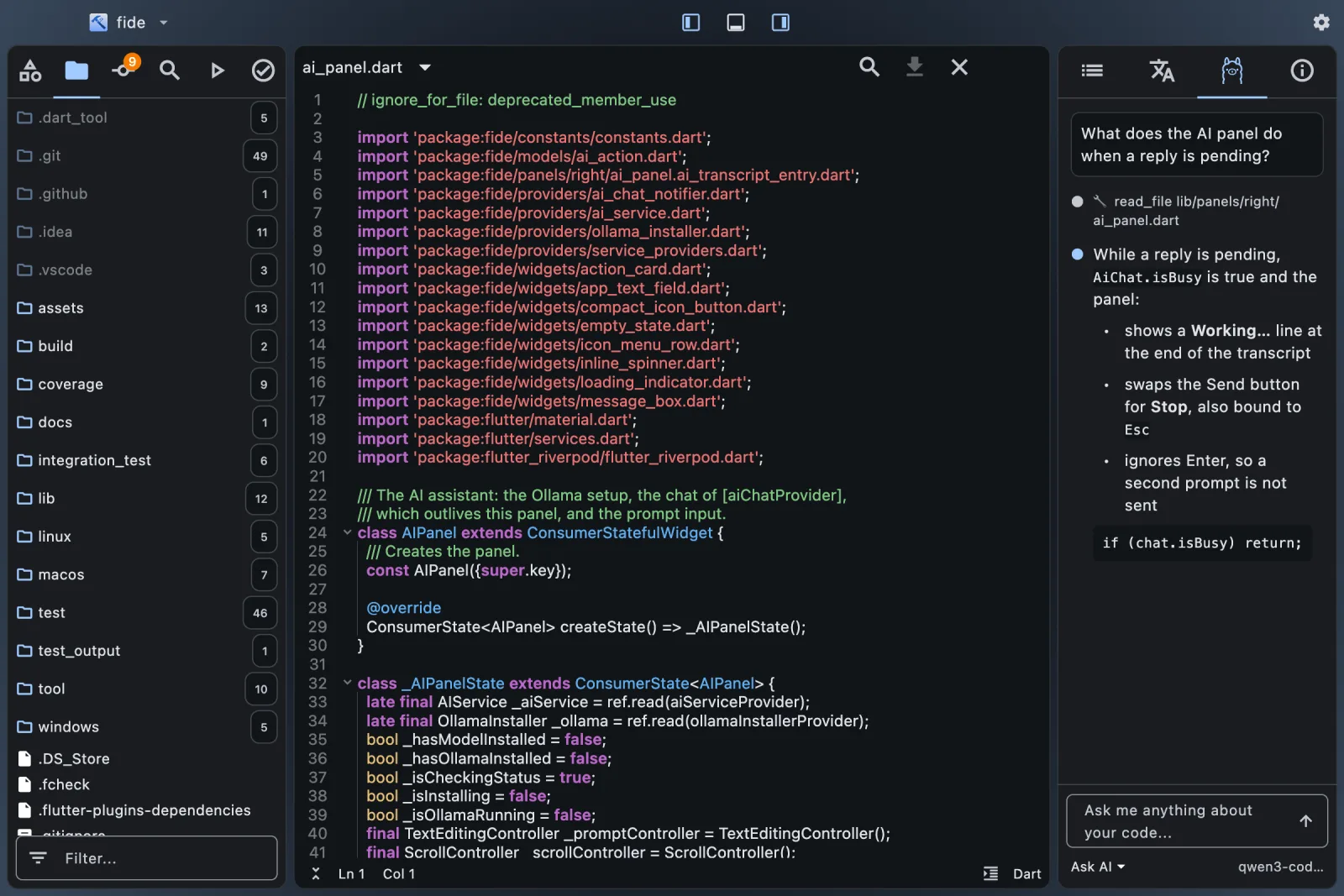
Ask, explain, generate, refactor, fix the last failed build, plus D.R.Y. and S.O.L.I.D. reviews fed by fCheck's findings.

The extras

App icon review, architecture graph, audio editor, font preview, a built-in terminal, and one-click auto-update.
FIDE's code editor with the folder tree on the left and the outline of the open Dart file on the right
The editor, the folder tree and the outline.
FIDE's AI panel answering a question about the open file, with the tool step it ran
The local AI reads your code before it answers.
Heads-up

Grassroots, and proud of it.

FIDE started in September 2025 as one developer's itch. Some 400 commits later it opens, runs and scores its own source. It's still a grassroots project: one maintainer, no company behind it, no marketing budget (you're reading the marketing budget). Expect rough edges, and expect them to get fixed fast when you report them.

Installing is a bit hacky for now

The builds work, but they aren't signed yet, so your OS will raise an eyebrow. Here's the whole ritual:

  1. Install the Flutter SDK. FIDE drives your own flutter and dart; it doesn't bundle them.
  2. Download the build for your OS:
  3. Talk your OS into it:
    • macOS: move FIDE.app to Applications first, launch it, then allow it in System Settings › Privacy & Security › Open Anyway.
    • Windows: More info › Run anyway.
    • Linux: untar it and run bundle/fide.
  4. Optional: the AI and translation features use Ollama. FIDE installs it and downloads the model for you.

After that, FIDE keeps itself up to date: it checks for a new release at launch and every four hours, and updates in one click.

Or the Flutter-fan way

Run it from source. It's a Flutter app, after all.

$ git clone https://github.com/vteam-com/FIDE.git
$ cd FIDE
$ flutter pub get
$ flutter run -d macos  # or windows, linux

Something didn't work? That's a bug report we want: open an issue.

Roadmap

Where FIDE goes next, with you.

A direction, not a promise. Every item below is up for grabs, and the order changes with whoever shows up to build it.

Shipped · 1.x
  • Widget-tree outline
  • Live @Preview with Fix Size
  • fCheck score and quick fixes
  • Local AI that edits your files
  • ARB localization, translated locally
  • App icon review across platforms
  • One-click auto-update
Next up
  • Code intelligence The Dart analysis server in the editor: completion, hover docs, go to definition, rename across the project.
  • Install without the hacks Signed and notarized builds, Homebrew, winget and Flatpak.
  • Debugger Breakpoints, stepping and variables, right in the Run panel.
  • Wrap with… Padding, Center, Expanded, Builder and friends as instant quick fixes. No AI needed.
Later
  • Tap to source Tap a widget in your running app and land on its line and its node in the outline.
  • Device bar Boot emulators and simulators and pick the run target from the title bar.
  • Visual golden tests Run golden tests and review each failure as a side-by-side image diff.
  • pub.dev panel Search packages, compare pub points and likes, add one in a click.
Dreams · help wanted
  • Drag to refactor Drag widgets around the outline tree and FIDE rewrites the build method.
  • Plugins in Dart Extend FIDE with a Flutter package: your panel, your widgets.
  • Rebuild radar Frame times and rebuild counts from the running app, painted on the widget tree.
  • Store-ready kit Store screenshots for every device size, release notes and version bumps in one checklist.

Have a better idea? Pitch it in an issue.

Contribute

Flutter fans wanted.

If you can build a Flutter app, you can build FIDE. It's Dart, Riverpod and widgets all the way down: no TypeScript, no Electron, no extension API to learn first.

Kick the tires

Open your own Flutter project in FIDE and file an issue for anything that breaks, confuses you or is missing.

Fix the install

Signing, notarization, a Homebrew cask, winget, Flatpak. Today's hackiest part makes the best first contribution.

Grab a roadmap item

Say hi in an issue to claim it, so two people don't build the same thing.

Add a quick fix

Deterministic refactorings are small, self-contained Dart, and each one saves somebody a trip to the AI.

Write tests

Coverage has room to grow, and every panel is a plain Flutter widget you can pump.

The house rules

  1. Open an issue first to talk about what you'd change.
  2. Follow AGENTS.md: it's short, and it keeps the code and the UI consistent.
  3. Run tool/check.sh before your pull request: analyze, tests, and fCheck at 100%.

Yes, 100%. fCheck tells you exactly what to fix, and FIDE fixes a lot of it for you.

Your seat is saved.

Star the repo, open an issue, or fork it and send your first pull request.

Into static analysis? fCheck, the brain behind FIDE's score, is open source too.